Admin Night: Clear Your Paperwork Pile in 40 Minutes
An admin night is one sitting where you work through the boring paperwork you’ve been avoiding, in timed ten-minute stretches instead of one long slog. Forty minutes is enough: four stations, ten minutes each, one at a time. The goal is to make the pile smaller than it was, and to stop while you would still come back.
Setting aside the time was never the part that failed
I’ve blocked out time for this before. More than once. I put it on the calendar, I told myself Sunday afternoon was the afternoon, and Sunday afternoon arrived and I did something else.
What I haven’t done is the version I’m about to describe, and I want to say that up front. I’m not writing this from the other side of a solved problem. I’m writing it because I worked out why the blocked-out time kept sliding, and the answer was embarrassingly simple. Nothing about the moment was different from every other evening I walked past that desk. Same chair, same pile, same lighting, same low-grade dread. I’d scheduled the task and changed nothing else, and then I was surprised when I behaved the way I always behave.
A friend is the one who put the useful version in front of me. She suggested that our next girls’ night should just be the two of us sitting down and doing all the dangling tasks neither of us has done. A night in, with company, that happens to have paperwork in it. The second she said it I understood what I’d been getting wrong. She wasn’t proposing more discipline. She was proposing a nicer evening that the task could ride along inside.
There is a name for the part that makes it work with someone else there. It is called body doubling, and if that idea is new to you, I wrote about why having someone nearby helps you start over on my other site. You don’t need a person for an admin night to work. It just gets easier with one.
How do you set up an admin night?
Give this five minutes and treat it as part of the job, not as stalling. The setup is what gets you into the chair, and sitting down is the hard part.
- Pick the spot, and make it somewhere other than your usual spot if you can. The kitchen table instead of the desk. You’ve been avoiding that desk for months, and the room already knows it.
- Make something to drink. Tea, wine, a Diet Coke with the good ice. It matters more than it sounds like it should, because it turns a chore into an occasion.
- Put one nice thing on the table. A candle, flowers from the grocery store, the good lamp. One thing, not a whole production.
- Phone face down, out of reach. Not in a drawer, because you need the timer. Just far enough that picking it up is a decision.
- Trash and recycling within arm’s reach. Half of that pile is going straight in the garbage, and getting up to throw things away is where people stop.
- A pen that works. I’m serious.
- Tell someone you are doing it. A text is enough. Or invite them, and make it the girls’ night version.
Romanticize it a little. The reason this works when a calendar block doesn’t is that you get something to look forward to, and a nice evening with a task in it is easier to show up for than an appointment with your own paperwork.
What are the four stations?
Ten minutes each. The timer is the point, because the timer stops one station from taking the whole hour. When it goes off, that station is over whether or not you finished it.
| Station | What you’re doing | Done when |
|---|---|---|
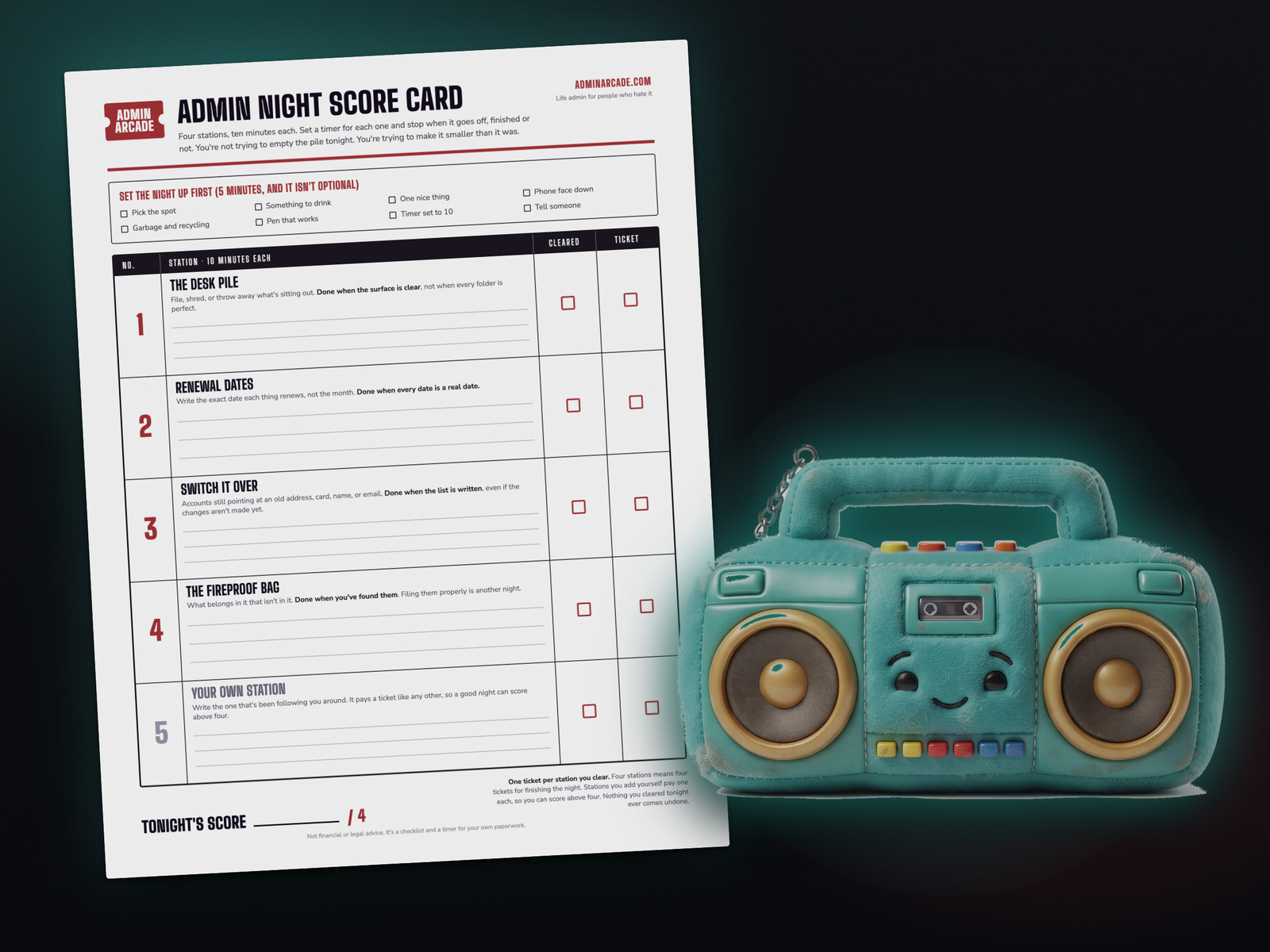
| 1The desk pile | File, shred, or throw away whatever is sitting out on the surface. Don’t open a filing project. Sort into keep, shred, and garbage, then deal with the keep pile as one stack. | The surface is clear, not when every folder is perfect. |
| 2Renewal dates | Write the exact date each thing renews. Insurance, domains, memberships, the yearly ones you forget exist until the charge lands. | Every date is a real date, not a month. |
| 3Switch it over | Anything still pointing at an old address, an expired card, a former name, or an email you stopped reading. Write the list first, change what you can. | The list is written, even if the changes aren’t made yet. |
| 4The fireproof bag | Find the documents that belong in it and aren’t in it. Birth certificates, titles, the passport, the policy you know you own and can’t picture. | You’ve found them. Filing them properly is another night. |
Swap any of these for something that is more yours. The four above are the ones sitting on my own list right now, which is why they’re the defaults, not because they’re the right four for everybody.
Renewal dates is the station that usually pays
It looks like the dullest of the four and it’s the one that tends to find money. A yearly charge is invisible in a two-month statement scan, so it renews for years without anyone deciding to keep it. Ten minutes of writing down exact dates means you can cancel before the charge instead of after it.
If you haven’t done a full sweep of what you are actually subscribed to, that’s its own job and it doesn’t fit in ten minutes. Do the subscription sweep on its own night, then bring the list back here and just add the dates. The autopay list, which card pays each of them, is its own night too.
Run it with the timer
This runs the night for you. Check off your setup, pick your stations, and it gives you one at a time with ten minutes on the clock. You never see the whole list while you’re working, which is deliberate, because looking at the whole pile is how the night gets abandoned in the first ten minutes. Nothing you type is sent anywhere. There’s no server behind it to send anything to.
Get the printable run sheet
If you'd rather be off a screen for this, which is a reasonable thing to want on a night with a candle on the table, print this instead. One page. The setup checklist runs across the top, the four stations each get a box with room to write, and there are two blank boxes at the bottom for the ones that are yours. The stop line is printed at the bottom on purpose.
No email, no signup. It's a PDF.
What to do when the fourth timer goes off
Stop. Put the pen down at forty minutes. Keep going only if you aren't crawling out of your skin at that point, and stop the moment you are. Stop early because you're much more likely to do a second one if the first didn't end badly. Forty minutes has no science behind it.
Leave the unfinished stations unfinished. A station you didn't reach is still there tomorrow, exactly as it was, and nothing you cleared tonight comes undone. There's no streak to keep up, and nothing to lose by waiting three months before the next one.
One more, and it's the one I have to tell myself. Don't spend the last five minutes tidying the results. Filing what you sorted, labelling the folders, making the list pretty, that's a different job, and it's the one that makes this feel like it never ends. Clear the surface, write the dates, find the documents, close the laptop.

Admin Night Boombox has a paper version. The Prize Counter is a blank sheet of twelve circles you print once and keep, and the prize stickers are the ones you cut out and stick on it. Both are free on one page, and that page always has the newest prizes.
Did the four stations on paper instead of in the tool? That still counts. Nothing on this site is locked behind a sticker, and the tally only ever goes up.
Questions people ask
How long should an admin night actually be?
Forty minutes of work, plus five to set up. Four stations at ten minutes each is long enough to make a visible dent and short enough that you'll agree to do it again. If forty is too many, run two stations and stop at twenty. A short one you finish beats a long one you bail out of halfway.
What if I don't finish a station in ten minutes?
You won't finish most of them, and that's how it's designed. Ten minutes won't finish it, and it isn't supposed to. Mark it, move to the next station, and pick it up next time. The station that runs long is the one that ends the night, so the timer is protecting the other three.
Does an admin night work better with other people?
Yes, and that's the version I'd try first. Sitting near someone who is also doing their own boring task makes starting much easier, which is the part that stops me. It works over video too. That's body doubling, and it's good reading if you've never worked out why you can do things in a library and not at home.
Is it safe to type my paperwork into the tool?
Nothing you type leaves your browser. There's no account, no login, and no server behind the tool to send anything to. It saves on your own device so you can come back to a half-finished night, and there's a button that wipes it. Don't type account numbers into it, or into anything else. It only needs enough words to remind you what you found.
How often should I do one?
Whenever the pile starts bothering you again. Some people land on monthly, but don't put it on a schedule you'll feel bad about breaking. The whole point is that this is a thing you do, not a thing you maintain.
What if the pile is way past one night?
It probably is, and that's fine. One night was never going to clear years of it. What one night does is prove the pile can get smaller, which is the thing you stop believing once it gets this bad. Do a second one when the first stops feeling recent.
Not financial or legal advice. It's a checklist and a timer for your own paperwork.
A tool I built
Energy Battery
Log your energy through the day and watch your battery fill, so you can see what actually charges you and what drains you.
Find your spark →I run an affiliate program on the tools I build. Approved affiliates earn 20% on what their referrals pay, for up to a year. US only for now. See the program →