Free Printable Autopay List + What a Replaced Card Breaks
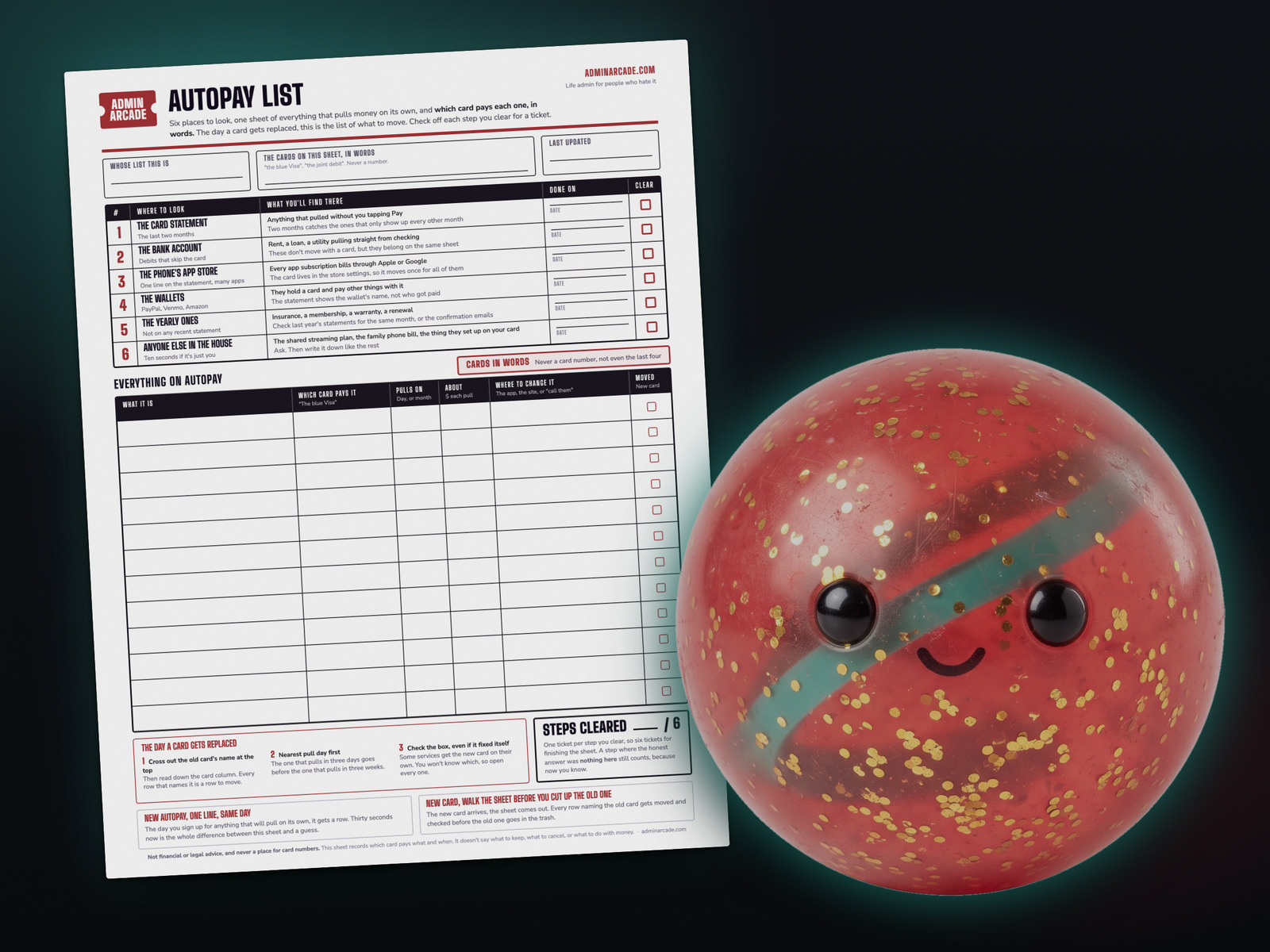
A printable autopay list is one sheet of everything that pulls money on its own: what it is, which card pays it in words, the day it pulls, and where to change it. You fill it from six places, one at a time: the card statement, the bank account, the phone’s app store, the wallets, the yearly charges, and anyone else in the house. The day a card gets replaced, the sheet is the list of what to move, nearest pull date first.
The ones I thought I’d already moved
When I closed my business, its credit card closed with it, and I had to move everything onto my new business cards. I thought I had changed all of them.
Then the emails started, a few of them. A payment didn’t go through, please update your card. Every one was a piece of software still billing to the old card.
It didn’t cost me anything. I fixed each one right away. What it cost was finding out one at a time. A sheet would have saved a lot of time and aggravation.
I still don’t have the sheet, and without one I’d find out the same way again.
Six places to look, one ticket each. Stop after any of them and what you have is still a real list. All six fit inside an admin night.
What breaks when your card gets replaced
“Replaced” covers three days: the account closes, which is what happened when I closed my business, it gets reissued with a new number after fraud, or it expires and the routine replacement shows up. Chase’s guidance on an expiring debit card says to give merchants with automatic payments “your new expiration date and security code.”
Some of your autopays will fix themselves. The card networks run updater services for this. In Visa’s words, “when participating issuers re-issue cards, they submit the new account number and expiration date” to Visa Account Updater, and participating merchants ask for it through their payment processors. Mastercard’s Automatic Billing Updater works the same way, and Mastercard says updates only reach merchants who registered ahead of time. American Express and Discover each publish a version too.
Both the bank and the merchant have to take part, and nothing on Visa’s pages says you get told which ones did. Visa offers issuers a report of the merchants who received your new number and says issuers “can then inform cardholders.” Can. And Visa’s page lists a “closed account advice” as its own kind of update, separate from a new number, so when an account closes the way mine did, a merchant learns the card is gone and nothing more.
So the rule: some will update on their own, you won’t know which, and the only way to find out is to open every one before its next pull. The list makes “every one” a real number.
Step 1: Read the last two months of the card statement
Anything on the statement you didn’t tap Pay for is an autopay. Write the name, which card, the day it pulled, roughly how much.
Two months, because some things bill every other month. It’s the same hunt as the subscription sweep, writing down a different thing: the sweep asks whether you still want it, this asks which card pays for it. If it’s the keep-or-cancel question you want answered first, I wrote up a ten-minute subscription audit on Seeding Serendipity.
Write the card in words, “the blue Visa,” never the number. A sheet with card numbers on it helps whoever picks it up. Same rule as the account list.
Step 2: Check the bank account for the ones that skip the card
Rent, a car loan, a utility pulling straight from checking. These don’t move when a card gets replaced, and they still go on the sheet so it’s one list. Write “checking” in the card column.
These are the ones where a bounce stacks up. The Consumer Financial Protection Bureau says “both the bank and the company might charge you a fee” when the balance is short. If you keep a printable bill calendar, the pull days are already on it. Copy them over.
Step 3: Open the phone’s app store subscriptions
Every app subscription bills through Apple or Google, so the statement shows one name for all of them. Apple’s support page says a charge from apple.com/bill “could be for apps, subscriptions, music and movie purchases, or more from Apple.”
- iPhone: Settings, tap your name, tap Subscriptions. The card is one menu over, under Payment & Shipping. Apple says it will “attempt to charge your payment methods in the order that they appear,” so one card change covers every app.
- Android: Settings, tap Google, then Manage your Google Account, then Payments & subscriptions, then Manage subscriptions. Google says each one renews on “the same payment method you used to buy the subscription.”
Write each app on its own line. If you’re not sure which card the store holds, write the store’s name and fix it later.
Step 4: Look inside the wallets
PayPal, Venmo and Amazon hold a card and pay other things with it, so the statement shows the wallet’s name and not who got paid.
- PayPal: Settings, then Payments, then “Automatic Payments” (PayPal’s help page also calls it “Subscriptions and saved businesses”). Pick the merchant, choose Change Payment Method.
- Amazon: Your Memberships and Subscriptions lists Prime and the rest, each with a Change link next to its payment method. Sites you paid through Amazon Pay sit under Merchant agreements, and Amazon says changing your default card updates all of them.
- Venmo: Direct Debit pulls from your Venmo balance. A recurring merchant checkout charges the method you picked, and Venmo’s user agreement says it falls back to a backup on your account if the first can’t be charged.
Step 5: Find the yearly ones
Insurance, a membership, a warranty. These pull once a year, so they’re on no recent statement, and a replaced card catches them months later.
Look at last year’s statements for this month and the next, or search your inbox for “renewal.” Write the month in the “pulls on” column. If you’ve made the things-that-expire list, copy the paid renewals across.
Step 6: Ask anyone else in the house
The shared streaming plan, the family phone bill, the thing they set up on your card once and forgot to mention. Ask, then write it down like the rest. If it’s just you, this step takes ten seconds. Check it off and take the ticket.
What a bounced autopay costs, in the companies’ own words
Mine were software, and software sends an email.
| Who | What they say happens |
|---|---|
| Verizon wireless | A returned payment fee of $20, $25 or $30 by state. Its Auto Pay terms say a payment “rejected, refused, returned, disputed, or reversed” by your card issuer lets Verizon charge the fee and remove you from autopay. |
| PG&E (utility) | “Your recurring payments will stop.” After a first failure you can re-enroll after 30 days. After two or more failed payments, after 365 days. |
| Auto insurance, Texas | The Texas Department of Insurance says a company must give 10 days’ notice before it cancels your policy. Not paying is one of the listed reasons. |
| Auto insurance, New York | New York’s Department of Financial Services counts a payment as on time if made within 15 days of the mailed nonpayment notice. |
| Bank-account autopay, anywhere | The CFPB: “both the bank and the company might charge you a fee if there is not enough in your account.” |
Build your list with Card Swap
Card Swap walks the same six steps and groups what you add by card. When a card gets replaced, tap “This card got replaced” for that card’s payments, nearest pull first, each with a Moved button. Name the new card at the end and the list is current again.
Nothing you type leaves your browser. There's no account and no server behind it, and it refuses anything in the card box with four digits in a row.
The printable autopay list
One page, free, no email required. The six steps across the top with a date line and a check box each, twelve rows for the autopays, and the three things to do the day a card gets replaced.
Two rules so the sheet stays true
New autopay, one line, same day. The day you sign up for anything that will pull on its own, it gets a row. Thirty seconds.
New card, walk the sheet before you cut up the old one. Every row naming the old card gets moved and checked before the old one goes in the trash. Capital One says its replacement cards arrive around four weeks before the old one expires. Chase, for one, doesn't publish a number, so the sheet is the reminder.
Clear all six steps and you've earned six tickets and Bounce Betty, the prize on this one. Nothing expires and there's no streak to lose, so a sheet you start tonight and finish next month still pays the same six.

Not financial or legal advice. Every fee, notice period and updater detail above is quoted by name from the company's or agency's own page, and yours will differ. This sheet records which card pays what, never what to keep or cancel.
Frequently asked questions
Do I have to update every autopay when my card is replaced?
Check every one, because you won't be told which updated on their own. Visa, Mastercard, American Express and Discover each run a service so participating merchants get your new card details automatically, but both the issuer and the merchant have to take part, and Visa says only that issuers "can" tell you which ones did.
Does a new expiration date break autopay?
It can. Chase's guidance on an expiring card says to give merchants with automatic payments your new expiration date and security code. Capital One notes one exception: replacing a damaged card doesn't change your card info.
Where do I find my subscriptions on an iPhone or Android phone?
On an iPhone, Settings, tap your name, tap Subscriptions, and the card is under Payment & Shipping. On Android, Settings, tap Google, then Manage your Google Account, then Payments & subscriptions, then Manage subscriptions.
What happens if an autopay fails?
It depends on who you're paying. Verizon lists a returned payment fee of $20 to $30 by state and can remove you from autopay. PG&E stops recurring payments and makes you wait 30 days to re-enroll, or 365 after two failures. Insurance sends a cancellation notice with a deadline, which in Texas is 10 days.
Is the printable autopay list free?
Yes, and there's no email required to get it.
A tool I built
Subscription Graveyard
Bury the subscriptions you've canceled, give each one a tombstone, and watch what you're saving pile up.
Bury your first one →I run an affiliate program on the tools I build. Approved affiliates earn 20% on what their referrals pay, for up to a year. US only for now. See the program →