Free Printable Subscription Tracker + The 7 Places They Hide
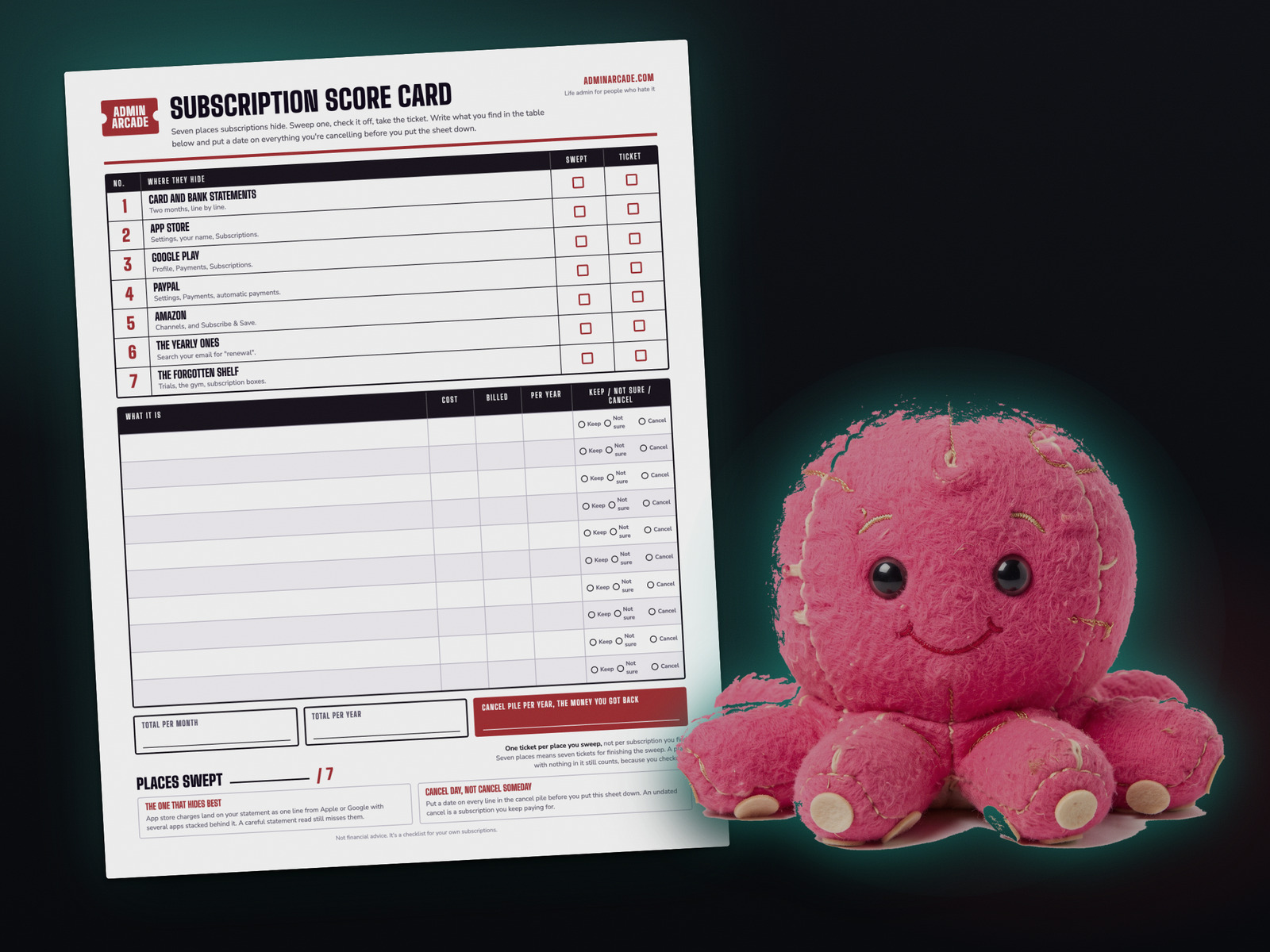
A subscription tracker only works if you can find the subscriptions first, and your card statement won’t show you all of them. Print the tracker at the bottom of this post, then work the seven places below in order. The one that slips past a careful reader is the app store, because a pile of small app charges arrives on your statement as a single line from Apple or Google.
I read my statements line by line and still missed one
I keep everything in databases now, so my subscriptions live in a list I can actually see. Before that, I did it the way the guides all tell you to. I opened the credit card statement and read it line by line, top to bottom, every charge.
An app got past me anyway. It billed through my Apple card, and Apple doesn’t put the app’s name on your statement. It puts its own name there, once, with everything you pay for stacked behind it. I was reading carefully. I just couldn’t see what I was looking for, because it wasn’t written down.
That’s the thing about a statement scan. It feels thorough. You did the boring work, you read every line, so you close the tab and assume you’re done. The charges that survive that process are the ones it structurally can’t show you, and they can sit there for years.
Where do subscriptions hide?
Work these in order. Each one catches a kind of charge the one before it misses.
| Where | What it catches that the others miss |
|---|---|
| 1Card and bank statements | Everything billed directly, under its own name. Start here, but treat it as the first pass and not the whole answer. |
| 2The App Store | Apps that bill through Apple. Your statement shows one Apple line, no matter how many apps are behind it. |
| 3Google Play | The same trick on Android, plus Google One storage, which renews on its own and is easy to forget you started. |
| 4PayPal automatic payments | Anything paid through PayPal, which lands on your statement as PayPal instead of the company you actually signed up with. |
| 5Amazon | Prime Video channel add-ons, Subscribe and Save deliveries, Audible and Kindle Unlimited. These renew on their own schedules. |
| 6The yearly ones | Domains, hosting, antivirus, password managers, cloud storage, memberships. A two-month statement scan can’t see these at all. |
| 7The forgotten shelf | Converted free trials, the gym, the storage unit, the subscription box, anything on a card you barely use. |
Where to look in the two that hide best
Apple. On an iPhone or iPad, open Settings, tap your name at the top, then Subscriptions. On a Mac, open the App Store, click your name in the bottom corner, then Account Settings, then Manage. From any browser, go to apps.apple.com/account/subscriptions. Scroll to the expired section too, because seeing what you signed up for before tends to jog loose a few you forgot.
Google. In the Play Store, tap your profile picture, then Payments and subscriptions, then Subscriptions. From a browser, go to play.google.com/store/account/subscriptions.
Do it right now with the sweep tool
This walks you through the same seven places one at a time, so you’re never staring at the whole job at once. Add what you find, mark each one keep, not sure, or cancel, and it totals what the cancel pile gives you back over a year. Nothing you type is sent anywhere. It stays in your browser and there is no server behind it to send anything to.
Get the printable tracker
If you would rather do this on paper, or you want something to leave on the counter until it's finished, print this. One page. The seven places run across the top as a checklist, there's room for sixteen subscriptions, and the totals boxes at the bottom include the one that actually matters, which is what a year of the cancel pile adds up to.
No email, no signup. It's a PDF.
Two rules that make this stick
Put a date on every cancel. A line marked cancel with no date next to it is a subscription you keep paying for. Write the day you'll do it, or do it right then while the account page is already open in front of you.
Cancelling in PayPal is only half of it. Turning off an automatic payment stops the money, but some companies treat the account as still open. Cancel with the company as well, then check your next statement to be sure it took.
Once the list exists, writing down the renewal dates is the follow-up job. That's station two of an admin night, forty minutes split into four ten-minute stations, and it's where a yearly charge stops sneaking up on you.
One thing before you start cancelling. Some of what you're paying for includes perks you may never have used, and a few are worth more than the subscription itself. There's a list of 340 of them on my other site, and the credit card ones are what I'd check first.

Sub Sucker has a paper version. The Prize Counter is a blank sheet of twelve circles you print once and keep, and the prize stickers are the ones you cut out and stick on it. Both are free on one page, and that page always has the newest prizes.
Did the sweep on paper instead of in the tool? That still counts. Nothing on this site is locked behind a sticker, and the tally only ever goes up.
Questions people ask
How often should I do a subscription sweep?
Twice a year is plenty once you've done the first full one. January and July work well, because the yearly renewals you found the first time tend to land in those windows. The first sweep is the long one. After that you're checking a list you already have.
Why can't I see app subscriptions on my bank statement?
Because Apple and Google are the merchant, not the app. They charge you and pay the developer, so your statement gets one line with their name on it and the individual apps never appear. The only place the real list exists is in your account settings with Apple or Google.
Is it safe to type my subscriptions into the tool?
Nothing you type leaves your browser. The tool has no account, no login, and no server to send anything to. It saves your progress on your own device so you can come back to a half-finished sweep, and there's a clear button that wipes it. Don't type card numbers into it, or into anything else. It only needs the name and the price.
What if I find something I can't cancel?
Mark it not sure and move on. Stopping the sweep to fight with one cancellation flow is how the whole job gets abandoned. Finish the seven places first, then come back to the awkward one with the rest of the list already done.
Not financial or legal advice. It's a checklist and a calculator for your own numbers.
A tool I built
Subscription Graveyard
Bury the subscriptions you've canceled, give each one a tombstone, and watch what you're saving pile up.
Bury your first one →I run an affiliate program on the tools I build. Approved affiliates earn 20% on what their referrals pay, for up to a year. US only for now. See the program →